Sunday, July 16, 2017

Digit Recognition - Multi-layer Perceptron classifier


Last Article I described some basic classifers to train the hand-written digits. After you run , you may notice that the accurancy can only reach up tp 92 %  in kaggle . which is not so nice. This article I will introduce a basic neural network - multi-Layer Perceptron classfier ,In this way , the result will be slightly improved . Ok , throw aways those boring math deductions and theories, Let's paste the Script directly here.


%%time

import numpy as np
import pandas as pd
from sklearn import metrics
from sklearn import datasets
from sklearn.neural_network import MLPClassifier
from sklearn.model_selection import KFold


dataset = pd.read_csv("train.csv")
target = dataset[[0]].values.ravel()
train = dataset.iloc[:,1:].values
test = pd.read_csv("test.csv").values

# testing set
x_finaltest = test

kf = KFold(n_splits = 10)

total_score1 = []
# 3 hidden layers, each layer 50 neutrons, try 50 first , if not good , then increase
model1 = MLPClassifier(hidden_layer_sizes=(50,50,50), alpha=1e-4,solver='lbfgs',random_state=1) 

for train_index ,test_index in kf.split(train):
    x_train = train[train_index]
    y_train = target[train_index]
    x_test  = train[test_index]
    y_test  = target[test_index]
      
    #train the model
    model1.fit(x_train, y_train)
       
    # test model
    y_predict1 = model1.predict(x_test)

    total_score1.append(metrics.accuracy_score(y_predict1,y_test))

#average score
print(np.mean(total_score1))

y_pred1 = model1.predict(x_finaltest)

np.savetxt('neural_4.csv', np.c_[range(1,len(x_finaltest)+1),y_pred1], delimiter=',',
           header = 'ImageId,Label', comments = '', fmt='%d')

0.947785714286
Wall time: 47min

Well ,After you run, you may notice that the score is improved from 92 % to 94.77%. Even though the score is still not so nice , yet you may notice the kaggle score is similar to your score and your score is indeed improved. So you can conclude that they may also use another neural network model to score your model.


I believe once you tune the parameters in this MLP you can still improve, but do it in your spare time to modify the hidden layer neutrons and layers, and also the solvers to see the results.


It's ok ,we will catch up bit by bit in future and the score will be finally nice  


Saturday, July 15, 2017

Oracle "Table"

Oracle table is a very very important chapter when i was studing the DBA course, Once I become a software engineer i feel very happy that i can forget the complex table structure concept which made me struggle in my OCP exam , leaving all those to DBA to handle. However I also feel lucky that i had studied that so that i can design a good table structure and erase lots of pain to my colleagues. Now I will do a tutorial about how it goes.

Capture.PNG
Table has lots of variaties ,not only including those table we create with the help of Hibernate/Ibatis or whatever, but something below:
  • Normal Table
  • Partition Table
  • Index Organised Table(IoT)
  • Cluster Table
  • Temporary Table
  • Nested Table (Tables in Table)
  • Object Table
High water mark : This is like a location identifier. It's the location that the biggest data block occupies. as the graph shown above. When you delete the data , it still won't go down , unless you use "rebuild , truncate , shrink , alter table, move" which can bring down the high water mark. This is very important concept as when Oracle do a full table scan , it will scan those areas below  HWM, so it will greatly affect the efficiency of full scan if the HWM is too high. 

PCTFREE : PCTFREE = 20% , when user is inserting data, data blocks will keep 20% redundancy or space so that data won't be inserted into this block fully. so the space left will be used for users to do some update manipulations . by default  : 10 %.

PCTUSED: PCTUSED = 40%, when user is doing delete , the "usage rate of data block"  <=  40% >= 60%, then let user do the insert manipulation.

ASSM : auto segment management, if this is on in tablespace, then you can only set PCTFREE, if off, you can set PCTFREE and PCTUSED both.


Create tablespace test01 datafile 'D:/app/test01.dbf' size 10m autoextend on //create table space
Create table t1(name varchar2(10)) tablespace test01; //create a table under test01
Select * from dba_extents where owner = 'scott' and segment_name = 't1';//check how many space used
Alter table scott.t1 allocate extent (datafile 'D:/app/test01.dbf' size 1m) // expand the storing space under tablespace t1, in reality useless.

Movement :

Alter table t1 move [tablespace user] //erase fragments in table t1[below HWM]
Alter table t1 move tablespace use2 // mave table into another tablespace, after Movement, index will be all gone, must rebuild

Analyze table t1 compute statistics for table ; // analyse table and generate statistics
Select table_name, blocks, num_rows from user_tables where table_name = 't2';
//check how many data block occupied by one table [below HWM] row by row,you must analyse first!

Shrink : the tablespace must set ASSM =Auto

Alter table t1 enable row movement [cascade] // turn on row movement function
Alter table t1 shrink space; // shrink table fragment, bring down HWM

Truncate :delete all table data but keep table structure, HWM is setted to the minimum, can't rollback


Drop table t1 [cascade constraints] [purge] //delete the table
Alter table t1 set unused column phone; 
Alter table t1 drop unused columns; //remove column, oracle will remove in some leisure time

Index organised table (IOT): it's ordered, data and index are stored in the same place, so when query, you only visit one data block(data and index together), compared with normal table (data and index seperated, occupy 2 blocks) , So if you query data using primary key very often , you can create a table as IOT.


Create table iot_student (sno, sname constraint pk primary key(sno)) organization index pctthreshhold 30 overflow tablespace users; // create a IOT 

Drop table iot_student; purge recyclebin; //remove IOT

Pctthreshhold //this param tells block proportion,when data exceeds this proportion,oracle will put all other columns except for primary key into overflow segment。

Cluster table : one data block holds data related to 2 related tables, when doing a join query, only need to scan one data block, very fast. steps :

  • create a cluster segment
  • create a relationship linking 2 tables with this cluster segment
  • create an index for this cluster

Create cluster cluster1(code_key number); //create cluster
Create table student(sno1 number, sname varchar2(10)) cluster cluster1(sno1); //create table to link the cluster
Create table address(sno2 number, zz varchar2(10)) cluster cluster1(sno2); // create table to link the cluster

// student and address are in the same block, if query need join s.sno1 = a.sno2  the spped will be very fast

Create index index1 on cluster cluster1; // create a index for the cluster

Select * from user_clusters; // check all the cluster infor
Select * from user_clu_columns; // check which columns lined to which clusters
Drop table student; drop table address;drop cluster cluster1; // delete cluster

Temporary table : table is used and owned by each user session.

Create global temporary table tmp_student(sno int, sname, varchar(20)) on commit preserve rows; // create temp table,remove all data when quiting this session
Disconnect
drop table tmp_student; //delete the temp table

Create global temporary table tmp_student(sno int, sname, varchar(20)) on commit delete rows; // create temp table, then commit/rollback, all data will be removed

Select table_name, temporary , duration from user_tables where table_name = 'tmp_student'
// check temp table infor,temporary= whether it is temp table,duration = when to delete data

Here i only demostrate a few of tables ,if you are interested, please leave a msg.

Oracle "Explain Plan"


You really want to tune your slow SQL? Then firstly you must know how it runs. That's is explain plan/statistics!


Table statistics and column statistics' collections by default are setted t to be runned 10 p.m everyday. At a non-collecting period for example 9 a.m, oracle can conduct a dynamic sampling to collect some statistics in memory temporarily. but When you are creating index in oracle , it will auto-collect statistics.

Normally there're 6 ways to run & see explain plan/statistics :

1 explain plan for select * from t1; select * from table(dbms_xplan.display()); // not so accurate

2 set autotrace on(result and statistics) //It will really run the SQL , but you can't see how many times a table is visited

3 select * from table(dbms_xplan.display_cursor(null,null,'allstats last')) //really run sql as well, but if it runs for quite long time, we must wait for it to finish, then we can see the result, time-consuming

4 select * from table(dbms_xplan.display_cursor('sql_id')); // NOTE: sql_id comes from "select * from v$sql"

5 // 10046trace
Alter session set events ‘10046 trace name context forever, level 2’; // open trace
 //run your sql here
        Alter session set events ‘10046 trace name context off’ // close trace
 //find the file produced


6 @?/rdbms/admin/awrsqrpt.sql // this is a tool in oracle

Recommend :

  • Normally you can use method 1 and 2,  
  • if multiple sqls are to be runned, you can use 4 and 6.
  • if lots of functions will be triggered and called, you can only use 5. 
  • if you want to check how many time table is visited , please use 3
anything unclear, please leave msgs!

Friday, July 14, 2017

Using index is not always good


Index can let your select very very fast. but can also let your update/insert very very slow, (Index is ordered, if update or insert is fired, it will re-order which is very costly), If your environment is more opt to system throughput, I will recommend you to use full can (full table scan + full index scan).

index logic failure:  index is ok to be used , but your query doesn't go by index.:)
index physical failure: index is removed.

Reverse index is good sometime becuase if so many indexes involved in this table , reverse index can avoid the hot block competing each other.


create index idx_id t(id) reverse;

Partition table insert : however, if index is not added, insert into partition table will be more costly than insert into normal table.

Aviod type conversion : put the specifc value into the column type specifed, type coversion will be very costly with index added.

Substr() trunc() : substr(column) and trunc(column) won't go by index , if these 2 functions are applied to columns.


Alter table t shrink space; //release high water mark . but index is still valid

Composite index : if query by a composite index, you gotta follow the order of indexes to fire the select query. reversed order or wrong order won't go by index

Hint way to create index : this part i think most developers are not clear . the hint way to create index is use /" "/,  this is very fast, try to use the hint way to create index rather than the parallel way.

Like : like "%peter" // won't go by index, like "per%" = like reverse("%per") // will go by index

Flashback :


flashback table t to before drop; // restore table from recyclebin,
                                     but all index & constrains are gone

Function index : if asc and decs are both involed like "order by col1 asc col2 desc" , try to create a function index (col1 asc, col2 desc)

Dummy index/virtual index : dummy index is not existed in reality , however it can deceive the oracle expain plan and simulate the result with indexs, if the result is good, then create a real index, if not ,don't need to do anything.


Alter session set "use nosegment indexes = true"
Create index idx_id on t(object_id) nosegment; //create dummy index

Finally please take notes :

  • check whether you add indexes in some big tables in oracle
  • check whether there are some indexes which never are used
  • check whether you add some indexes on foreign key columns in tables
  • check which tables have too many indexes
  • check whether you overuse too many composite indexes
  • check whether there are some foreign key constraint invalidated
  • check which indexes have a high height
  • check whether there are some index invalidated
  • check whether your indexes are duplicated with composite index
  • check which indexes have parallel setted
  • check which statistic infor is too old


Why index is so fast ?


        is my recommendation for sql tuning. 

Index is a storing unit which can store column values . It is ordered,  low height and root-leaf structure. It retrives the column values orderly with rowid and put them together into oracle blocks called index block. Index structure is a physical structure. Index will take effect in columns in where statement eg : ( select * from person where name ='peter').


1. Index tree's height is low : because index blocks won't be full in reality , layer is often few (3 layers are 3 system IO firing), In big data query, if query 1 or 2 records, it will be fast. however it won't just querying 1 or 2 records , so system IO takes more query cost (slowly). If order by , group by and sum() all these functions are involved, it will be very slow.Thus distibuted file system like hadoop comes into the picture.

Query the first 100 records : use "as content from dual connect by level <= 100";


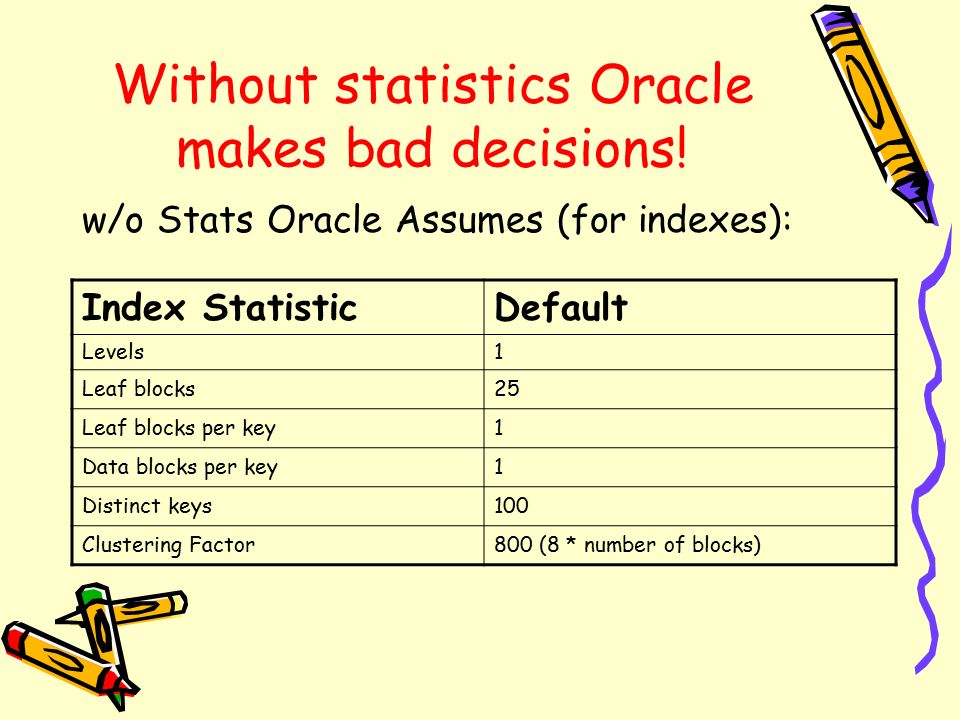
Select index_name, blevel,, leaf_blocks,num_rows, distinct_keys,clustering_factor from user_ind_statistics where table_name in ('T1','T2'); //check the table's index height,
blevel is the index layer number/index height,0 is less than 1 layer。


2.Index stores column values : index is consist of column value and rowid.

Index won't store null value:  if indexed columns have null value, even though it has index, but it will still go full table scan. So , in case of this occasion, try to use : 

select count(*) from t where object_id is not null;

or before table creation do :

alter table modify object_id not null;

Tuning sum() avg() etc : columns in all these functions must have indexes added so as to reduce logic read.

3.Index is ordered itself: 

optimise order by :"order by"'s cost is very high so try to add index in columns with order by .  because index is ordered itself , so it won't re-order which saves the cost and memory but cost CPU a lot.

optimise max() : add index in the column with max function. because index is ordered and store column values with tree structure, so if index is added, it will go to the leaf and find the last child directly which can greatly reduce the logic read.

optimise distinct() : distinct() doesn't go through index but by default go by hash unique algorithsm causing lots of logic read and PGA memory, so my way to query is : 


Select /* index(t) */ distinct object_id from it;  //add index to distinct columns

Don't optimise union : 


select object id from t1 union select object_id from t2;

Look at the above query using union, it will auto-filter the duplicated records , so It definately produces sorting,. Thus union + index is useless ,however, you can add index to union all.

composite index:  if multiple columns should be selected, you can create a composite index, if there exist where statement with "= , < or >", you must put the equaled columns before select.

if composite index is introduced(id, name), you don't need to create index seperately like (name). try to use "in" rather than > or < :


Select /* + index_desc(a,idx_t) */ * from t a order by owner asc ,object_type desc;

index in partition tables : your query will be very very fast !!

query min() and max() : you can't write select max(num), min(num) from ..., that will be very slow. because indexes in this occasion can't go to leaves to find the max and min at the same time, it can't look at 2 directions at the same time. thus optimised query will be :

Select max ,min from (select max(num_id) max from t) a,(select min(num_id) min from t) b;

Index scan methods 

In OCP 11G exam, when i studied it , there are 5 ways to scan the index,  I am not sure in 12C , these 5 still exist or have their name changed. So i just share some of my experience in 11G :

index range scan : range scan, it will refer to other indexes to cross-validate whether find the index specified.

index unique scan : unique scan, create unique index...; it's slightly faster than the range scan, because it won't refer to other indexes, as it is unique as defined.

table access by index rowid : no nedd to create index, this is the fastest way, directly locate the row!

index full scan & fast full scan : fast full scan is slightly faster, if order by is added , it will go index full scan , read one block once, ordered. without order by, it will go fast full scan , read multiple blocks once, not ordered.

index skip scan : if data is small , and limited in one column , it will jump, shuffle and fetch. eg : there is one column called "status", first 100 rows are "view" last 100 rows are "unread". in this situation, it will go skip scan.

Hope my share can help you improve your application . leave msgs if anything unclear
 

Thursday, July 13, 2017

Digit Recognition Basic Models Intro


This article will do some try & error on models : Logistic , LDA, Ridge, Lasso with ovr & ovo check. No optimisation will be applied, however I will conduct some basic 10 fold cross validation and split(80%,20%) so as to increase the accurancy a bit to see different results .

Data set from kaggle : https://www.kaggle.com/c/digit-recognizer


1. read kaggle data


%%time

import numpy as np
import pandas as pd
from sklearn import datasets 
from sklearn import metrics
from sklearn.cross_validation import train_test_split

dataset = pd.read_csv("train.csv")
target = dataset[[0]].values.ravel()
train = dataset.iloc[:,1:].values
test = pd.read_csv("test.csv").values

# cross validation : training set 80% ,test set:20%
x_train,x_test, y_train, y_test = train_test_split(train,target,train_size=0.8,test_size=0.2)

x_finaltest = test # x = input , y = output final test set X

print(x_train.shape)
print(y_train.shape)
print (x_test.shape)
print (y_test.shape)

print(x_finaltest.shape)

2. Logistic OvO


%%time

from sklearn.multiclass import OneVsOneClassifier
from sklearn.linear_model import LogisticRegression

model1 = OneVsOneClassifier(LogisticRegression())
model1.fit(x_train, y_train)

# print accurancy
y_predict1 = model1.predict(x_test)
print (metrics.accuracy_score(y_predict1,y_test))

y_pred1 = model1.predict(x_finaltest)

np.savetxt('logistic_ovo_2.csv', np.c_[range(1,len(x_finaltest)+1),y_pred1], delimiter=',', 
           header = 'ImageId,Label', comments = '', fmt='%d')

3. Logistic OvR


%%time
from sklearn.multiclass import OneVsRestClassifier
from sklearn.linear_model import LogisticRegression

model4 = OneVsRestClassifier(LogisticRegression())
model4.fit(x_train, y_train)

# print accurancy
y_predict4 = model4.predict(x_test)
print (metrics.accuracy_score(y_predict4,y_test))

y_pred4 = model4.predict(x_finaltest)

np.savetxt('logistic_ovr_2.csv', np.c_[range(1,len(x_finaltest)+1),y_pred4], delimiter=',', 
           header = 'ImageId,Label', comments = '', fmt='%d')

4. LDA OvR


%%time
from sklearn.lda import LDA
model2 = OneVsRestClassifier(LDA())
model2.fit(x_train,y_train)

# print accurancy
y_predict2 = model2.predict(x_test)
print (metrics.accuracy_score(y_predict2,y_test))

y_pred2 = model2.predict(x_finaltest)

np.savetxt('lda_ovr_2.csv', np.c_[range(1,len(x_finaltest)+1),y_pred2], delimiter=',', 
           header = 'ImageId,Label', comments = '', fmt='%d')

5. LDA OvO


%%time
from sklearn.lda import LDA
model3 = OneVsOneClassifier(LDA())
model3.fit(x_train,y_train)

# print accurancy
y_predict3 = model3.predict(x_test)
print (metrics.accuracy_score(y_predict3,y_test))

y_pred3 = model3.predict(x_finaltest)

np.savetxt('lda_ovo_2.csv', np.c_[range(1,len(x_finaltest)+1),y_pred3], delimiter=',', 
           header = 'ImageId,Label', comments = '', fmt='%d')

6. Ridge OvO


from sklearn.linear_model import Ridge

model5 = OneVsOneClassifier(Ridge(alpha=1.0)) # 0. 0.1, 2
model5.fit(x_train,y_train)

# print accurancy to find the best alpha
y_predict5 = model5.predict(x_test)
print (metrics.accuracy_score(y_predict5,y_test))

#final predict
y_pred5 = model5.predict(x_finaltest)

np.savetxt('ridge_ovo_2.csv', np.c_[range(1,len(x_finaltest)+1),y_pred5], delimiter=',', 
           header = 'ImageId,Label', comments = '', fmt='%d')

7. Ridge OvR


from sklearn.linear_model import Ridge

model6 = OneVsRestClassifier(Ridge(alpha=1.0)) # 0. 0.1, 2
model6.fit(x_train,y_train)

# print accurancy to find the best alpha
y_predict6 = model6.predict(x_test)
print (metrics.accuracy_score(y_predict6,y_test))

#final predict
y_pred6 = model6.predict(x_finaltest)

np.savetxt('ridge_ovr_2.csv', np.c_[range(1,len(x_finaltest)+1),y_pred6], delimiter=',', 
           header = 'ImageId,Label', comments = '', fmt='%d')

8. Lasso OvO


from sklearn.linear_model import Lasso

model7 = OneVsOneClassifier(Lasso(alpha=0.1)) # 0. 0.1, 2
model7.fit(x_train,y_train)

# print accurancy to find the best alpha
y_predict7 = model7.predict(x_test)
print (metrics.accuracy_score(y_predict7,y_test))

# final predict
y_pred7 = model7.predict(x_finaltest)

np.savetxt('Lasso_ovo_2.csv', np.c_[range(1,len(x_finaltest)+1),y_pred7], delimiter=',', 
           header = 'ImageId,Label', comments = '', fmt='%d')

9. Lasso OvR


from sklearn.linear_model import Lasso

model8 = OneVsRestClassifier(Lasso(alpha=0.1)) # 0. 0.1, 2
model8.fit(x_train,y_train)

# print accurancy to find the best alpha
y_predict8 = model8.predict(x_test)
print (metrics.accuracy_score(y_predict8,y_test))

# final predict
y_pred8 = model8.predict(x_finaltest)

np.savetxt('Lasso_ovr_2.csv', np.c_[range(1,len(x_finaltest)+1),y_pred8], delimiter=',', 
           header = 'ImageId,Label', comments = '', fmt='%d')

10 Folds 

1. read kaggle data


%%time

import numpy as np
import pandas as pd
from sklearn.lda import LDA
from sklearn import datasets 
from sklearn import metrics
from sklearn.linear_model import Ridge
from sklearn.model_selection import KFold
from sklearn.linear_model import Lasso
from sklearn.multiclass import OneVsOneClassifier
from sklearn.multiclass import OneVsRestClassifier
from sklearn.linear_model import LogisticRegression

dataset = pd.read_csv("train.csv")
target = dataset[[0]].values.ravel()
train = dataset.iloc[:,1:].values
test = pd.read_csv("test.csv").values

# test set
x_finaltest = test

kf = KFold(n_splits = 10)

2. Logistic OvO


%%time

total_score1 = []
model1 = OneVsOneClassifier(LogisticRegression())
for train_index ,test_index in kf.split(train):
    x_train = train[train_index]
    y_train = target[train_index]
    x_test  = train[test_index]
    y_test  = target[test_index]
    
    # print ("train: {0}  test:{1}".format(train_index,test_index))
    
    #train the model
    model1.fit(x_train, y_train)
    
    # test model
    y_predict1 = model1.predict(x_test)
    # print accurancy
    #print (metrics.accuracy_score(y_predict1,y_test))
    total_score1.append(metrics.accuracy_score(y_predict1,y_test))

    #平均分
print(np.mean(total_score1))

y_pred1 = model1.predict(x_finaltest)

np.savetxt('logistic_ovo_3.csv', np.c_[range(1,len(x_finaltest)+1),y_pred1], delimiter=',', 
           header = 'ImageId,Label', comments = '', fmt='%d')

2. Logistic OvR


%%time

total_score2 = []
model2 = OneVsRestClassifier(LogisticRegression())
for train_index ,test_index in kf.split(train):
    x_train = train[train_index]
    y_train = target[train_index]
    x_test  = train[test_index]
    y_test  = target[test_index]
    
    #print ("train: {0}  test:{1}".format(train_index,test_index))
    
    #train the model
    model2.fit(x_train, y_train)
    
    # test model
    y_predict2 = model2.predict(x_test)
    # print accurancy
    #print (metrics.accuracy_score(y_predict2,y_test))
    total_score2.append(metrics.accuracy_score(y_predict2,y_test))
    
print(np.mean(total_score2))
    
y_pred2 = model2.predict(x_finaltest)

np.savetxt('logistic_ovr_3.csv', np.c_[range(1,len(x_finaltest)+1),y_pred2], delimiter=',', 
           header = 'ImageId,Label', comments = '', fmt='%d')
Others will be omitted . please leave msg if you find it useful'

The most accurate model is known as CNN , i will demostrate in another article in future

Utility Classes under Java util.concurrent package


When you check the java util.concurrent package , there are some utility classes provided , after removing lots of abstract classes which is useless for our users. we may notice couple of them are quite useful in our work. I will describle the most popular 4 utility classes here in this article;

CountDownLatch : this classes normally will be used to monitor some initializations ,  after some initializations , it will help to inform the main thread to continues to do its job. for example : in zookeeper, in the begining, web connection will be firstly established and some instances will be initialised then. Thus initialization will be done after connection is establised. So this behavious will be monitored and informed by CountDownLatch


 final CountDownLatch countDown = new CountDownLatch(2);
 Thread t1 = new Thread(new Runnable() {
  @Override
  public void run() {
      try {
            System.out.println("enter thread t1" + "waiting for other threa                                            d to finish...");
            countDown.await(); 
             // wait & block here,because new CountDownLatch(2), so if ther                           e are 2 threads making countDown signal, this thread will 
                continues to go 
            System.out.println("t1 thread continues to go...");
   } catch (InterruptedException e) {
            e.printStackTrace();
    }}},"t1");
  
 Thread t2 = new Thread(new Runnable() {
   @Override
   public void run() {
      try {
           System.out.println("t2 initialise...");
           Thread.sleep(3000); // sleep
           System.out.println("t2 finishs init,inform t1 to continue...");
           countDown.countDown(); // make a countdown signal
          } catch (InterruptedException e) {
            e.printStackTrace();
          }
   }});
  Thread t3 = new Thread(new Runnable() {
   @Override
   public void run() {
      try {
          System.out.println("t3 initialise...");
          Thread.sleep(4000);
          System.out.println("t3 finish the init,inform t1 to continue..");
          countDown.countDown(); // make a countdown signal
    } catch (InterruptedException e) {
          e.printStackTrace();
    }
   }
  });
  
  t1.start();
  t2.start();
  t3.start();

CyclicBarrier:Threads must all ready , then they can go , if any one thread is not ready. all other threads must wait for it .


static class Runner implements Runnable {  
     private CyclicBarrier barrier;  
     private String name;  
     
     public Runner(CyclicBarrier barrier, String name) {  
         this.barrier = barrier;  
         this.name = name;  
     }  
     @Override  
     public void run() {  
         try {  
             Thread.sleep(1000 * (new Random()).nextInt(5));  
             System.out.println(name + " ready OK.");  
             barrier.await();  // wait,new CyclicBarrier(3),3 athletes must be
                                         all ready = await() is called 3 times , 
         } catch (InterruptedException e) {  
             e.printStackTrace();  
         } catch (BrokenBarrierException e) {  
             e.printStackTrace();  
         }  
         System.out.println(name + " Go!!");  
     }  
 } 
 
    public static void main(String[] args) throws IOException, InterruptedException {  
        CyclicBarrier barrier = new CyclicBarrier(3);  // 3 athlets , called 3 times 
        ExecutorService executor = Executors.newFixedThreadPool(3);  
        
        executor.submit(new Thread(new Runner(barrier, "john")));  
        executor.submit(new Thread(new Runner(barrier, "peter")));  
        executor.submit(new Thread(new Runner(barrier, "luci")));  
  
        executor.shutdown();  
    }  

Differences :
   CountDownLatch is one thread waiting for other N threads information, then in the end one thread run
   CyclicBarrier is multiple threads wait for one another and all run together in the end.

Semaphore : = ticket checker / bus conductor, which is used to limit the threads in high concurrency.


        // thread pool 
        ExecutorService exec = Executors.newCachedThreadPool();  
        // only allow 5 threads visit simoutanously  
        final Semaphore semp = new Semaphore(5);  
        // simulate 10 clients visit  
        for (int index = 0; index < 20; index++) {  
            final int NO = index;  
            Runnable run = new Runnable() {  
                public void run() {  
                    try {  
                        // acquire ticket,only 5 threads can be in,once there is a sl                          ot, then another thread can be let in ,limit the stream。
                        semp.acquire();  
                        System.out.println("Accessing: " + NO);  
                        //simuate real business logic
                        Thread.sleep((long) (Math.random() * 10000));  
                        // after visit, release resource.  
                        semp.release();  
                    } catch (InterruptedException e) {  
                    }  
                }  
            };  
            exec.execute(run);  
        } 
        
        try {
   Thread.sleep(10);
  } catch (InterruptedException e) {
   e.printStackTrace();
  }
        
        //System.out.println(semp.getQueueLength());
         
        // exit thread pool 
        exec.shutdown();  
    }  

Future : used for a request waiting for response for a long time. so future will create a thread to fetch the data asyncronously and this dones't block the main thread to run. once future thread is finished, you can come back and check the data later.


private String para;
 
 public UseFuture(String para){
  this.para = para;
 }
 
 /**
  * simulate real business logic, very time-consuming
  */
 @Override
 public String call() throws Exception {
  //simulate a time consuming request
  Thread.sleep(5000);
  String result = this.para + "process finished";
  return result;
 }
 
 //main method
 public static void main(String[] args) throws Exception {
 String queryStr = "query";
 //FutureTask,pass in a business logic,this class implement Callable
 FutureTask<String> future = new FutureTask<String>(new UseFuture(queryStr));
  
 FutureTask<String> future2 = new FutureTask<String>(new UseFuture(queryStr));
 //create a thread pool
 ExecutorService executor = Executors.newFixedThreadPool(2);
   
 Future f1 = executor.submit(future);
 Future f2 = executor.submit(future2);
 System.out.println("request finished");
  
 try {
  //this part can do the main business logic
  System.out.println("process real business logic...");
  Thread.sleep(1000);
 } catch (Exception e) {
  e.printStackTrace();
 }
 //call and get the data,if call() hasn't finished,it will block and wait,
          FutureTask is asyncronous。aaa will print first, future will print second
 System.out.println("data:" + future.get());
 System.out.println("data:" + future2.get());
        System.out.println("aaa"); 
 executor.shutdown();

Add Loading Spinner for web request.

when web page is busily loading. normally we need to add a spinner for the user to kill their waiting impatience. Here, 2 steps we need to d...