Sunday, September 17, 2017

Java 8 - Data collection


Data collection is simplified in Java 8 syntax very much. you only need to point out "the expected result " not to worry about how to collect. In Java 8 , there exist a factory class "Collectors", let't see how it applies.

Math Problems 


long howManyDishes = menu.stream().collect(Collectors.counting()); // ==
long howManyDishes2 = menu.stream().count();
  
Comparator<Dish> dishCaloriesComparator = Comparator.comparingInt(Dish::getCalories); 
Optional<Dish> mostCalorieDish = menu.stream()
      .collect(Collectors.maxBy(dishCaloriesComparator)); // get object with max calories
  
// get the total calories
int totalCalories = menu.stream().collect(Collectors.summingInt(Dish::getCalories));
  
// get the average calories
double avgCalories = menu.stream().collect(Collectors.averagingInt(Dish::getCalories));
  
// get total, average, max, min 
IntSummaryStatistics menuStatistics = menu.stream().collect(
                               Collectors.summarizingInt(Dish::getCalories));

String Concatenation


String shortMenu = menu.stream().map(Dish::getName).collect(Collectors.joining(", "));

Reduce


// get total calories in reduing way
int totalCalories2 = menu.stream().collect(Collectors.reducing(0, Dish::getCalories,
                                           (i, j) -> i + j));
  
// get the max calories
Optional<Dish> mostCalorieDish2 = menu.stream().collect(Collectors.reducing(                        (d1, d2) -> d1.getCalories() > d2.getCalories() ? d1 : d2));
  
// self-implement toList collector
Stream<Integer> stream = Arrays.asList(1, 2, 3, 4, 5, 6).stream();
List<Integer> numbers = stream.reduce(new ArrayList<Integer>(), // init value
  (List<Integer> l, Integer e) -> { l.add(e);return l; }, // process
  (List<Integer> l1, List<Integer> l2) -> {
                               l1.addAll(l2);return l1; }); // final process
  
// total calories
int totalCalories3 = menu.stream().collect(Collectors.reducing(0,Dish::getCalories,
                                                                 Integer::sum));
int totalCalories4 = menu.stream().mapToInt(Dish::getCalories).sum(); // old way

Group By

Group by is like SQL group by statement., you can do nexted grouping , criteria grouping ...


// group by type , type is an enum
Map<Dish.Type, List<Dish>> dishesByType = menu.stream().collect(
                                          Collectors.groupingBy(Dish::getType));
  
// criteria grouping
Map<CaloricLevel, List<Dish>> dishesByCaloricLevel = menu.stream().collect(
  Collectors.groupingBy(dish -> {
   if (dish.getCalories() <= 400)  {
    return CaloricLevel.DIET; 
   } else if (dish.getCalories() <= 700) {
    return CaloricLevel.NORMAL;   
   }else {
    return CaloricLevel.FAT;
   }}));
// nested grouping
Map<Dish.Type, Map<CaloricLevel, List<Dish>>> dishesByTypeCaloricLevel = 
          menu.stream().collect(
   Collectors.groupingBy(Dish::getType, // 1st grouping
    Collectors.groupingBy(dish -> { // 2ed grouping
     if (dish.getCalories() <= 400) 
      return CaloricLevel.DIET;
     else if (dish.getCalories() <= 700) 
      return CaloricLevel.NORMAL;
     else 
      return CaloricLevel.FAT;
     })));
  
// collecting data with grouping
// result is : {MEAT=3, FISH=2, OTHER=4}
Map<Dish.Type, Long> typesCount = menu.stream().collect(
                  Collectors.groupingBy(Dish::getType, Collectors.counting()));
  
// get the max calories of each group , group by type
//result is : {FISH=Optional[salmon], OTHER=Optional[pizza], MEAT=Optional[pork]}
Map<Dish.Type, Optional<Dish>> mostCaloricByType = menu.stream().collect(
                  Collectors.groupingBy(Dish::getType,
    Collectors.maxBy(Comparator.comparingInt(Dish::getCalories))));
  
// get the max colories of each group , retrive value of each optional from above
//result is {FISH=salmon, OTHER=pizza, MEAT=pork}
Map<Dish.Type, Dish> mostCaloricByType2 = menu.stream().collect(
                Collectors.groupingBy(Dish::getType, // group by type
  Collectors.collectingAndThen(Collectors.maxBy(
                Comparator.comparingInt(Dish::getCalories)), //transformed Collector
  Optional::get))); // function of transfering
  
// grouping by can pass in 2 params , the second param will apply to all elements of each   group.
Map<Dish.Type, Integer> totalCaloriesByType = menu.stream().collect(
    Collectors.groupingBy(Dish::getType, Collectors.summingInt(Dish::getCalories)));
  
  
// get all caloricLevels of each Dish Type
// Collectors.mapping is powerful like map()
Map<Dish.Type, Set<CaloricLevel>> caloricLevelsByType = menu.stream().collect(
 Collectors.groupingBy(Dish::getType, Collectors.mapping( dish -> { 
   if (dish.getCalories() <= 400) {
    return CaloricLevel.DIET; 
   } else if (dish.getCalories() <= 700) {
    return CaloricLevel.NORMAL;
   } else {
    return CaloricLevel.FAT;
   }},Collectors.toSet())));
  
// point out which kind of set you want to use
Map<Dish.Type, Set<CaloricLevel>> caloricLevelsByType2 = menu.stream().collect(
 Collectors.groupingBy(Dish::getType, Collectors.mapping( dish -> { 
  if (dish.getCalories() <= 400) {
   return CaloricLevel.DIET;
  } else if (dish.getCalories() <= 700) {
   return CaloricLevel.NORMAL;
  } else {
   return CaloricLevel.FAT;  
  }},Collectors.toCollection(HashSet::new))));


Partition By

Partion By is similar to Group by but the input parameter is limited to "Predicate".


//{false=[pork, beef, chicken, prawns, salmon],
//true=[french fries, rice, season fruit, pizza]}
Map<Boolean, List<Dish>> partitionedMenu =
 menu.stream().collect(Collectors.partitioningBy(Dish::isVegetarian));
  
List<Dish> vegetarianDishes = partitionedMenu.get(true); // to retrive values
// == 
List<Dish> vegetarianDishes2 = menu.stream().filter(Dish::isVegetarian).collect(
                                                    Collectors.toList());
    
// nexted partioning & grouping , producing a 2 level grouping
//{false={FISH=[prawns, salmon], MEAT=[pork, beef, chicken]},
// true={OTHER=[french fries, rice, season fruit, pizza]}}
Map<Boolean, Map<Dish.Type, List<Dish>>> vegetarianDishesByType = menu.stream().collect( Collectors.partitioningBy(Dish::isVegetarian,
      Collectors.groupingBy(Dish::getType))); 
                                  // getType is not predicate so use group by


Friday, September 15, 2017

Off-Heap memory


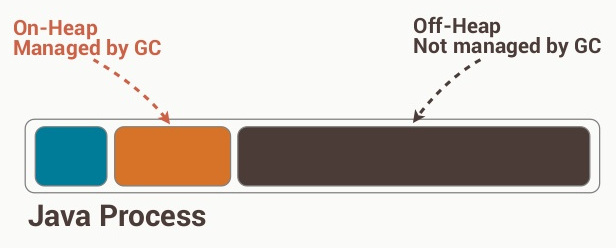
Java GC can only run in JVM heap which is called on-heap memory. However, to control the rubbish collection size of Java GC to realse some pressure of it . we can also open some memory space outside JVM heap in the Operating system level. This part of memory is called off-heap memory.


How do we manipulate off-heap memory ?

Normally there exits 3 opensource library for us to use , Chronicle Queue、Chronicle Map and Thread Affinity . These 3 can help us manipulate off-heap memory flexibly.

When do we use off-heap memory ?

  1. When Some Java NIO related APIs are called,  we may use off-heap memory indirectly. Operating system's kernel(eg: linux kernel) will directly write data into the off-heap memory rather than do like normal API caching one copy of data in the linux kernel then copying another one into the application when the application want to read. 
  2. When Java JVM management can't fullfil the project's requirement, we need to use the off-heap memory and manage it flexbily ourselves. 

For example : 


One incoming connection is to ask for 2M to create 2000 small Objects in Java and to release this 2M memory immediatly  when connection is finished/broken. For Java GC, this is a extra burden to manage those extra 2000 objects  and GC doesn't know those 2000 Objects' memory can be released immediatly after being used (Connection is finsihed). But we , programmers, know this logic and we know better what will happen in the system memory and JVM, so in that case , we can write code ourselves to manage the memory in the most efficient way.

How do we create a off-heap memory space?

One of those methods is to use DirectBuffer :


ByteBuffer.allocateDirect(size)

Another way is to use JNI to write a C/C++ extension in JAVA, in the extension, we don't create memory space in JVM.

But normally, I don't think people may need write in this very backend way.
If you are focus on normal business logic , I think chronicleMap will fullfil your requirement.
If you are writing some frameworks in Java related to NIO, the first method may apply(eg: Netty , ActiveMQ).
But if you don't limit your language in Java, write a C extension to control the whole system. This is the best solution, isn't it.

Sunday, September 10, 2017

Introductory python code of bayes


This article is a introduction of how to use bayes in python. naive bayes is a probability model/formula which is used under lots of constraints . In reality , I seldom use it as normally data from industrial environment can't fit the bayes' constraints which is "Law of large numbers" and max-lilkelihood normally is build under lots of assumptions which make the model inaccurate.  In this article ,I won't derive the formula as typing math formulas in computer is a terrible work for me. :)

I will use the digit recognition data set from kaggle to demostrate how the basic flow works .


Import libs & datas 


%%time

import numpy as np
import pandas as pd
from sklearn.lda import LDA
from sklearn import datasets 
from sklearn import metrics
from sklearn.model_selection import KFold
from sklearn.naive_bayes import GaussianNB  # import into bayes lib
dataset = pd.read_csv("train.csv")
target = dataset[[0]].values.ravel()
train = dataset.iloc[:,1:].values
test = pd.read_csv("test.csv").values

x_finaltest = test  # test data

kf = KFold(n_splits = 10)

Train & predict in 10 Fold CrossValidation 

total_score1 = []
gnb = GaussianNB()
for train_index ,test_index in kf.split(train):
    x_train = train[train_index]
    y_train = target[train_index]
    x_test  = train[test_index]
    y_test  = target[test_index]
        
    gnb.fit(x_train, y_train)  # train the model
     
    y_predict1 = gnb.predict(x_test)  # predict 

    total_score1.append(metrics.accuracy_score(y_predict1,y_test)) # compare and score

# print average score
print(np.mean(total_score1))

y_pred1 = gnb.predict(x_finaltest) # predict

# save into file
np.savetxt('bayes.csv', np.c_[range(1,len(x_finaltest)+1),y_pred1], delimiter=',', header = 'ImageId,Label', comments = '', fmt='%d')

0.556166666667
Wall time: 4min 32s


Monday, September 4, 2017

Bit & BitSet


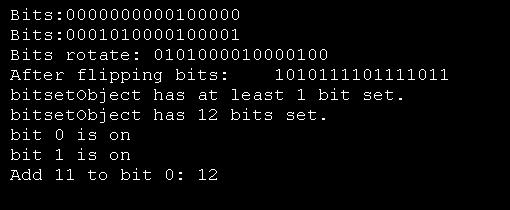
Bit and BitSet are very commonly used in profiling your java code. Also, In interviews, your interviwers may also ask some questions about it . Raw bit manipulations are mostly tested in job interviews which are hard for most of us but BitSet are mostly used in real projects which is easy to use.


Basics

And(&)
0 & 0= 0
1 & 0 = 0
0 & 1= 0
1 & 1 =1
Or (|)
0 | 0 = 0
1 | 0 = 1
0 | 1 = 1
1 | 1 = 1
Xor (^)
0 | 0 = 0
1 | 0 = 1
0 | 1 = 1
1 | 1 = 0

x << y means x shifted by y bits to the left. for example :
               00011001 << 2  = 00000110
               00011001 << 4  = 10010000
x >> y means x shifted y bits to the right , for example :
               00011001 >> 2 = 00000110
               00011001 >> 4 = 00000001

Interview Questions

You have two 32-bit numbers, N and M and 2 bit positions, i and j .write a method to set all bits  between i and j in N  equal to M(eg: M becomes a subString of N located at i and starting at j)
Example : Input : 10000000000 , M = 10101, i = 2, j = 6
                   Output : N = 10001010100


public static int updateBits(int n , int m, int i, int j) {
  int max = ~0; // All 1's
  
  // 1's through position j, then 0's
  int left = max - ((1 << j) - 1);
  
  // 1's after position i
  int right = ((1 << i) - 1);
  
  // 1's , with 0's between i and j 
  int mask = left | right;
  
  // clear i through j, then put m in there
  return (n & mask) | (m << i);
  
 }

Bitset : BitSet is introduced in Java 1.1 and it only has a few of methods which are commonly used. But These methods are very helpful in tuning our application expecially in Comparison & Filtering.

Previously, if the criteria in our if-statement is comparison, for example

List<Bid> candidateBid = new ArrayList<>();
PotentialBid potentialBid = new PotentialBid();
candidateBid.stream()
	.filter(x -> x.getAutionType() == potentialBid.getAutionType()) // int
	.filter(x -> x.getCountryCode() == potentialBid.getCountryCode()); // String

Improvement makes matching faster :


BitSet candidateBid = new BitSet(); // imagine it has datas
candidateBid.and(autionTypeMatch.getCandidates(bid)); // get intersection set == filter
candidateBid.and(countryMatcher.getCandidates(bid)); // get intersection set == filter

Bitset can hold 2^31 -1 elements , in other word , it can hold huge amount of data.
So , There are still other applications of BitSet , like save a billion data....

Java 8 - Replace null with Optional


NullPointerException is a common exception you may encounter in coding , in Java 8 , you can replace null with optional , thus the NullPointerException can be totally removed. Of course you can also use if statement to judget whether it is null.


public class Car {
 private String name; // A car must have a name
 private Optional<Insurance> insurance; // A can can have insurance or not insured
 
}

Create a Optional


Optional<Car> optCar = Optional.empty(); // a empty Optional
Optional<Car> optCar2 = Optional.of(car); // create an optional from another object
Optional<Car> optCar3 = Optional.ofNullable(car); // A optional can accept null.

Optional<Insurance> optInsurance = Optional.ofNullable(insurance);
Optional<String> name = optInsurance.map(Insurance::getName); // retrive value from Optional Object


// combine multiple filter to retrive
public String getCarInsuranceName(Optional<Person> person) {
return person.flatMap(Person::getCar)
             .flatMap(Car::getInsurance)
             .map(Insurance::getName)
             .orElse("Unknown");
}


// 2 optional judgetments
public Optional<Insurance> FindCheapInsurance(Optional<Person> person, Optional<Car> car {   
 if (person.isPresent() && car.isPresent()) {
  return Optional.of(findCheapestInsurance(person.get(), car.get()));
 } else {
  return Optional.empty();
 }
}

How to use

for example you have a object which is probably containing null.


Object value = map.get("key");

Now, you decalre this Object in a Optional way :


Optional<Object> value = Optional.ofNullable(map.get("key"));

Be careful, Optional has lots of sub Classes like OptionalInt、OptionalLong and OptionalDouble, So Don't try to use Optional<Integer> . Below is another exmaple of Optional encapsulation.


public static int readDuration(Map<String,String> props, String name) {
 return Optional.ofNullable(props.get(name))
   .flatMap(Car::stringToInt) // convert String into Int
   .filter(i -> i > 0) // filter those > 0
   .orElse(0); // if it throws exception or < 0, then make it == 0 
 }
 
public static Optional<Integer> stringToInt(String s) {
 try {
  return Optional.of(Integer.parseInt(s)); // convert String into Int
 } catch (NumberFormatException e) {
  return Optional.empty();
 }
}

Optional is quite new in Java, Even though It has a lot of fancy features, but we still don't use it so ofen as the performance degrade a lot when we use Optional in real projects.


Thursday, August 31, 2017

Java 8 - CompletableFuture to do asynchromous crawlling


Asynchrnous calling is done previous in Java 7 by Future , But I think you don't want to use that if you have used that before. because it's blocking there.... So in Java 8, A more powerful utility class is invented to solve this problem. it's called CompletableFuture.


Bad way to encapsulate : below is the traditional way to write the completableFurture(cf), it will wait and complete to save value into cf and it also will handle any exception in between the calling.But This code is too long and redundant...


public Future<Double> getPriceAsyncBad(String product) {
   // create a cf,which will return the result later
CompletableFuture<Double> futurePrice = new CompletableFuture<>();
   new Thread( () -> {
    try {
 double price = calculatePrice(product); // this function will sleep for 1 second
 System.out.println("api call has finished");
 futurePrice.complete(price); // return the value to cf after a long wait, cf stops
    } catch (Exception ex) {
 futurePrice.completeExceptionally(ex); // throw exception, and stop the cf
    }
    }).start(); // asynchronous computation 
    return futurePrice;
}
 

Good way to write : In java 8, there is a clean way to write. It has threadpool + exception + complete . All in one.


//new way ,CompletableFuture factory 
public Future<Double> getPriceAsyncGood(String product) {
    return CompletableFuture.supplyAsync(() -> calculatePrice(product));
}

Main Method :


public static void main(String[] args) {
   Shopp shop = new Shopp("BestShop"); 
   Future<Double> futurePrice = shop.getPriceAsyncGood("my favorite product");
  
   System.out.println("Main Thread continue...");
  
   try {
 double price = futurePrice.get(); 
        // conjested and waiting for future, like a semophore!! code can't continue
 System.out.println(price);
   } catch (Exception e) {}
}

Main Thread continue...
api call has finished
142.40742856631343


Alright , This is one small example showcasing a crawler fetching one product price asynchronously from one shop. what if it's from multiple shops . for example, I want to know what's the price of Iphone8  in different shops .


List<CompletableFuture<String>> priceFutures = shops.stream()
          .map(shop -> CompletableFuture.supplyAsync( 
                    () -> String.format("%s price is %.2f", shop.getName(),
                                                            shop.getPrice(product))))
          .collect(Collectors.toList());

But this return List<CompletableFuture<String>> which is not what we want. we want List<String> ,join() will get the result from completableFuture == get(), the only difference is join() won't throw any exception. 


public List<String> findPrices(String product) {
   List<CompletableFuture<String>> priceFutures = shops.stream()
        .map(shop -> CompletableFuture.supplyAsync(() -> shop.getName() + " price is " +
                                                         shop.getPrice(product)))
        .collect(Collectors.toList());
  return priceFutures.stream()
                     .map(CompletableFuture::join)  //wait all processes to finish and get
                     .collect(toList());
}

Ok, It seems perfect for our application. because it fulltils our target. However if you do it in this way, it will be very slow. Becuase internally , its threadpool size is preconfigured commonly which is not optimised for different cases. So Let's configure our threadpool size to speed it up.


// optimised threadpool
// threadpool = the smaller between shop size and 100.
Executors.newFixedThreadPool(Math.min(shopp.size(), 100), new ThreadFactory() { public Thread newThread(Runnable r) { Thread t = new Thread(r); t.setDaemon(true); // use deamon, it won't hinder the application. return t; } });

Use it


CompletableFuture.supplyAsync(() -> shop.getName() + " price is " +
                                    shop.getPrice(product), executor);


Ok,Let's see an exmaple how CompletableFuture process a series of  job flows using thenApply() and thenCompose() :


private final Executor executor = public List<String> findPrices(String product) {
   List<CompletableFuture<String>> priceFutures = shops.stream()
   // asyn to get price
.map(shop -> CompletableFuture.supplyAsync(() -> shop.getPrice(product), executor)) 
    .map(future -> future.thenApply(Quote::parse)) // parse the quote
    .map(future -> future.thenCompose(quote -> 
    // first cf's result as second cf's input in thenCompose
 CompletableFuture.supplyAsync(() -> Discount.applyDiscount(quote), executor))) 
         // asyn to apply quote
   
    .collect(Collectors.toList());
return priceFutures.stream().map(CompletableFuture::join).collect(Collectors.toList());
    
}

you may notice, thenCompose will take the first cf's output as the second cf's input. in other word, these 2 cfs are linked and connected in sequence. So what if our 2 cfs has no relationship , so we purely want 2 unrelated thread to run . then we can use thenCombine()


Future<Double> futurePriceInUSD =
CompletableFuture.supplyAsync(() -> shop.getPrice(product))
                   .thenCombine(
                        CompletableFuture.supplyAsync(
                            () -> exchangeService.getRate(Money.EUR, Money.USD)),
                        (price, rate) -> price * rate
);

Ok, Now, the requirement may change, you are crawlling prices from different websites. you want 2 scenarios one is when all is ready then return . one is any one has value to return , then return. so how to implement this 2 scenarios? we use anyOf() and allOf() , but we must convert into cf array first.


CompletableFuture[] futures = findPricesStream("myPhone")  // convert into cf array  .map(f -> f.thenAccept(System.out::println))
  .toArray(size -> new CompletableFuture[size]);
  
// all threads of cf have return value . then join and return
CompletableFuture.allOf(futures).join();
// any threads of cf have return value . then join and return
CompletableFuture.anyOf(futures).join();  

Ok, if your last cf have no return <Void>, and you still want to do some post processing like : printing. you can use thenApply()


findPricesStream("myPhone").map(f -> f.thenAccept(System.out::println));

That's all.

Wednesday, August 30, 2017

Java 8 - Restructure legacy code


How do we convert the ledgacy code into Lamda Style ?  In Java 8, you may encounter that one function can be done in Java 8 with multiple approaches , So which implementation shall we choose ?


                   Restructure 1 - Anonymous Class to Lamda 

// convert from anonymous class into lamda
Runnable r2 = (Runnable) () -> System.out.println("Hello");

Restructure 2 - Use predefined implementations


// Don't use
int totalCalories = menu.stream().map(Dish::getCalories).reduce(0, (c1, c2) -> c1 + c2);
// recommend 
int totalCalories = menu.stream().collect(Collectors.summingInt(Dish::getCalories));    
// Don't use
inventory.sort((Apple a1, Apple a2) -> a1.getWeight().compareTo(a2.getWeight()));
// recommend 
inventory.sort(comparing(Apple::getWeight));

Restructure 3 - Use Stream 


menu.parallelStream().filter(d -> d.getCalories() > 300).map(Dish::getName)
                     .collect(toList());

The code above is a transfer from normal collection loop into Stream way , However, In our real work, This kind of code is hard to be implemented. as In the collection loopping, we may use break, continue or return , situations are complex . Now, this issue can be solved by some third party library


Restructure 4 - short & frequent data retrival 


public static void main(String[] args) {
   // generateDiagnostic() is frequently triggered
   log(Level.FINER, () -> "Problem: " + generateDiagnostic());
}
 
public static void log(Level level, Supplier<String> msgSupplier) {
 //...
}
 
public static String generateDiagnostic() { return "ok"; }

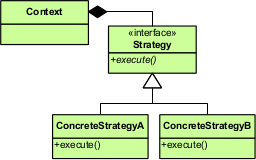
Restructure 5 - Strategy Pattern


The above Image is the old Strategy Pattern Demo , Now, We don't need it any more and we don't need to create extra classes to implement an interface but can declare and use strategy directly.


// Strategy A
Validator numericValidator = new Validator((String s) -> s.matches("[a-z]+"));
boolean b1 = numericValidator.validate("aaaa");
  
// Strategy B
Validator lowerCaseValidator = new Validator((String s) -> s.matches("\\d+"));
boolean b2 = lowerCaseValidator.validate("bbbb");

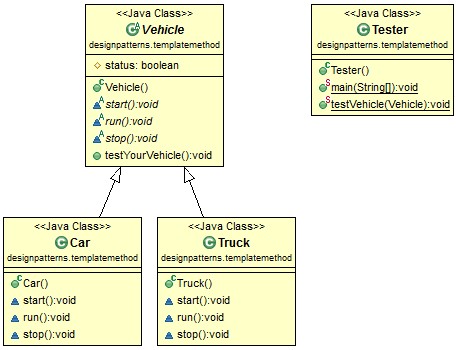
Restructure 6 - Template Pattern


The above illustration is a normal template pattern , well what if you need another template with just a samll difference with original template, in Java 7, You need to recreate a new template , In Java 8, It's very simple & dynamic.


public abstract class OnlineBanking {
   // overrall template
   public void processCustomer(int id, Consumer<Customer> makeCustomerHappyBehaviours) {
 Customer c = DataBase.getCustomerWithId(id);
 makeCustomerHappyBehaviours.accept(c); // can accept differnt behaviours
   }
}


public class BankOfTokoyOnlineBanking extends OnlineBanking {
        // bank of tokoy's template
public void myTemplate() { new BankOfTokoyOnlineBanking().processCustomer(1337, 
                       (Customer c) -> System.out.println("Hello " + c.getName()));
 }
}

Restructure  7 - Chain Of Responsibility

This is so StraitForward with the help of Function interface discussed in previous article. 


public String processLineA() {
     UnaryOperator<String> headerProcessing = (String text) -> "From Raoul Alan: " + text;
    
     UnaryOperator<String> spellCheckerProcessing = (String text) -> 
                                                     text.replaceAll("labda", "lambda");
    
     Function<String, String> pipeline = headerProcessing.andThen(spellCheckerProcessing);
    
     String result = pipeline.apply("sexy?!!");
     return result;
}

Restructure 8 - Factory Pattern

we have discussed this previously in method reference.


final static Map<String, Supplier<Product>> map = new HashMap<>();
static {
 map.put("loan", Loan::new);
 map.put("stock", Stock::new);
 map.put("bond", Bond::new);
}
 
public static Product createProduct(String name){
 Supplier<Product> p = map.get(name);
 if(p != null)  {
      return p.get();
 }
 throw new IllegalArgumentException("No such product " + name);
}

Restructure 9 - Debug

Lamda's Stream is a flow/pipleline process. then How do we debug them step by step like what we did previously adding those break point in application ? We use peek()


List<Integer> result = numbers.stream()
  .peek(x -> System.out.println("from stream: " + x))
  .map(x -> x + 17)
  .peek(x -> System.out.println("after map: " + x))
  .filter(x -> x % 2 == 0)
  .peek(x -> System.out.println("after filter: " + x))
  .limit(3)
  .peek(x -> System.out.println("after limit: " + x))
  .collect(toList());

from stream: 3
after map: 20
after filter: 20
after limit: 20
from stream: 4
after map: 21
from stream: 5
after map: 22
after filter: 22
after limit: 22


Add Loading Spinner for web request.

when web page is busily loading. normally we need to add a spinner for the user to kill their waiting impatience. Here, 2 steps we need to d...