Tuesday, August 29, 2017

Java 8 - Stream

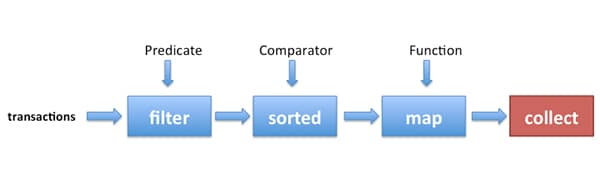
Stream in java 8 is just a interface to better manipulate the collection in a flow /Streamline way , let's see some demos .


Integration Demo 1 - Basics


public static void main(String[] args) {
  
 List<Dish> menu = new ArrayList<>();
 List<Dish> dishes = menu.stream() // convert into Stream Object
    .filter(d -> d.getCalories() > 300) // == if statement
    .limit(3) // == limit the result size
    .skip(2)  // == abandon the first 2 result
    .sorted(...) // sort by asc, can pass a Comparator as well
    .collect(Collectors.toList()); // convert back to list 
    
}

Integration Demo 2 - Map

Map function is to implement such and such a method upon each element in collection.


List<Dish> menu = new ArrayList<>();
List<Integer> dishNameLengths = menu.stream()
    .map(Dish::getName) // retrive each element's name
    .map(String::length) // further retrive each name's length
    .distinct()
    .collect(Collectors.toList());

flatMap function is to implement such and such a method on each element, then combine multiple Stream into one Stream.


List<String> words = new ArrayList<>();
List<String> uniqueCharacters = words.stream()
   .map(w -> w.split("")) // convert into multple Stream<String[]>
   .flatMap(Arrays::stream) // combine into one Stream<String>
   .distinct()
   .collect(Collectors.toList());

Integration Demo 3 - Match & Find

Match & Find is implemented in Java 7 using regular expression, In Java 8 , it gives you more flexbile way to do it . In Stream API, the following functions are provided :

                          allMatch、anyMatch、noneMatch、findFirst  and findAny


public static void main(String[] args) {
 List<Dish> menu = new ArrayList<>();
 // match
 if (menu.stream().anyMatch(Dish::isVegetarian)) { // at least one matched
      System.out.println("matched");
 }
    
 if (menu.stream().allMatch(d -> d.getCalories() < 1000)) { // all matched
      System.out.println("matched");
 }
 if (menu.stream().noneMatch(d -> d.getCalories() >= 1000)) { // none matched
      System.out.println("matched");
 }
}

Optional<T> interface is the return type of Java 8 Match & Find, Becuase If none is found , It may throw NullPointerException,So this Interface is invented to avoid that . It has 4 inherited methods

  • isPresent()  , if something is returned, return true, if nothing is returned, return false. 
  • ifPresent(Consumer<T> block), if somehting is returned, then run a code block.
  • T get(), if something is retured, then get the returned value, else throw NoSuchElementExceptio
  • T orElse(T other), if nothing is returned, it can set a default value and return back. 


Optional<Dish> dish = menu.stream()
  .filter(Dish::isVegetarian)
  .findAny();
  
menu.stream().filter(Dish::isVegetarian)
         .findAny()
         .ifPresent(d -> System.out.println(d.getName())); // if something is returned, 
                                                              then print 
   
List<Integer> someNumbers = Arrays.asList(1, 2, 3, 4, 5);
Optional<Integer> firstSquareDivisibleByThree = someNumbers.stream()
   .map(x -> x * x) // inner product of each element
   .filter(x -> x % 3 == 0)
   .findFirst(); // 9

Integration Demo 4 - Reduce

What's reduce? well , you may hear of mapreduce, reducing is a process of summarizing the result or final math computation.


public static void main(String[] args) {
 List<Integer> numbers = Arrays.asList(1, 2, 3, 4, 5);
  
 int sum = numbers.stream().reduce(0, (a, b) -> a + b); // get the sum
  
 int product = numbers.stream().reduce(1, (a, b) -> a * b); // get the product
  
 Optional<Integer> max = numbers.stream().reduce(Integer::max); // get the max
  
 Optional<Integer> min = numbers.stream().reduce(Integer::min); // get the min 
  
 List<Dish> menu = new ArrayList<>();
 int count = menu.stream()
  .map(d -> 1)
  .reduce(0, (a, b) -> a + b); // count the total , using mapreduce
}

Integration Demo 6 - Number Steam

Stream is not always the boss , sometimes , when it convert into some primitive types to facilitate some computations , it may face autoboxing and unboxing issues, thus , some his little brothers are invented. IntStream、DoubleStream & LongStream


public static void main(String[] args) {
 List<Dish> menu  = new ArrayList<>();
 int calories = menu.stream()
  .mapToInt(Dish::getCalories) // convert Stream into IntStream
  .sum();
  
 IntStream intStream = menu.stream().mapToInt(Dish::getCalories);
 Stream<Integer> stream = intStream.boxed(); // upgrade IntStream back to Stream
   
 OptionalInt maxCalories = menu.stream()
   .mapToInt(Dish::getCalories)
   .max(); // get the max
 int max = maxCalories.orElse(1); // if no max value, then return 1 as default
  
  
 IntStream evenNumbers = IntStream.rangeClosed(1, 100) // do between 1~100
    .filter(n -> n % 2 == 0);
 System.out.println(evenNumbers.count());
    
    
 Stream<int[]> pythagoreanTriples = IntStream.rangeClosed(1, 100)
                        .boxed() // upgrade to Stream
                        .flatMap(a -> IntStream.rangeClosed(a, 100)
                        .filter(b -> Math.sqrt(a*a + b*b) % 1 == 0)
                        .mapToObj(b -> new int[]{a, b, (int)Math.sqrt(a * a + b * b)})); 
                        // convert primitive type into Object
}

Integration Demo 7 - Create Steam

Stream Creation as we know is from collection. Yes, That's the commonest way. However, There're still some other ways to create a Stream which are not commonly used.
public static void main(String[] args) {
      // created from values 
      Stream<String> stream = Stream.of("Java 8 ", "Lambdas ", "In ", "Action"); 
  
      Stream<String> emptyStream = Stream.empty(); // create a empty Stream
  
      int[] numbers = {2, 3, 5, 7, 11, 13};
      int sum = Arrays.stream(numbers).sum(); // created from array
      
      // created from a file 
      Stream<String> lines = Files.lines(Paths.get("data.txt"), Charset.defaultCharset()); 
      // created from function iterate() 
      Stream.iterate(0, n -> n + 2).limit(10).forEach(System.out::println); 
      
      // created from function generate()
      Stream.generate(Math::random).limit(5).forEach(System.out::println); 
  
      IntStream twos = IntStream.generate(new IntSupplier() {
                  public int getAsInt() {
                         return 2;
      }}); // created from code block   
 }


Well , That's all about the guide of Stream. In Next article , I will demostrate how to make use of different Streams to encapsulate a powerful application.

Monday, August 28, 2017

Java 8 - Compound encapsulation


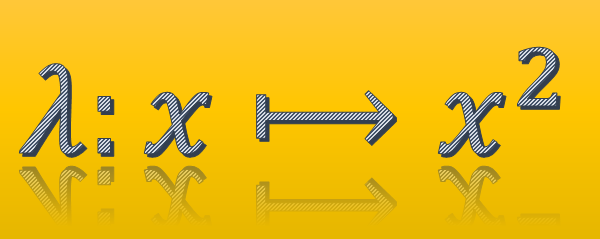
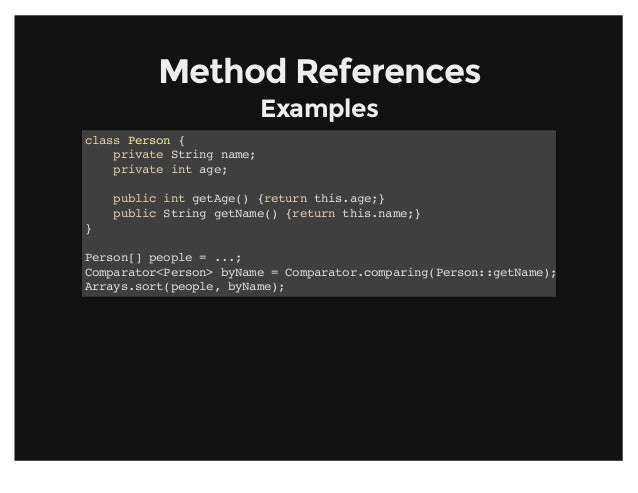
In previous articles , we know how to write method references and different method interfaces. Well , Those stuffs are only a substitute of java 7 syntax, it seems that doesn't bring much of convenience. 

In this article , I will make use of what we learn about method reference and method interfaces before and talk about how we use it in our real project scenarios.


Compound Comparator

In java 7 , if we want to sort a collection, we can't do so much but write a anonymous class of comparator interface and this can only compare once. like :

Comparator<String> com = new Comparator<String>() {
       @Override
       public int compare(String o1, String o2) {
          return 0;
 }
};

In java 8, you not only can encapsulate the comparator but can cascade the comparsion as well :


List<Apple> inventory = new ArrayList<>();

// if  ur comparator is complex, pick it out to encapsulate  
Comparator<Apple> c = Comparator.comparing(Apple::getWeight);

// if ur comparator is a reverse order of weight   
inventory.sort( Comparator.comparing(Apple::getWeight).reversed() );
  
// if u encounter same weight , u want to sort in country asc order again.
inventory.sort( Comparator.comparing(Apple::getWeight)
                          .reversed()
                          .thenComparing(Apple::getCountry));

Compound Predicate<T>

Predicate as we all know is a boolean judgement tool in previous article. Normally, we use boolean in if statement with lots of conditions :


if (apple.getWeight() > 120 && apple.getWeight() < 140 
                                                   || apple.getCountry().contains("US")) {
    ...
}

In Java 8 , it can fulfill all your requirements :


public static void main(String[] args) {
  
   // whether it is red apple.
   Predicate<Apple> redApple = Apple::getRedApple;
  
   // whether it is not red apple,  // math negation
   Predicate<Apple> notRedApple = redApple.negate();
  
   // whether it is red and heavy apple,  // math conjunction
   Predicate<Apple> redAndHeavyApple = redApple.and(a -> a.getWeight() > 150);
  
   // whether it is red and heavy or green apple, // math conjunction and disjunction 
   Predicate<Apple> redAndHeavyAppleOrGreen = redApple.and(a -> a.getWeight() > 150)                                                    .or(a -> "green".equals(a.getColor()));
}

Note: and and or follow order from left to right , so a.or(b).and(c)  equals (a || b) && c

Compound Function<F,T> 

In previous article , we know that Function interface is used to retrive something from an Object. So of course, we can do some cascading manipulations like : retrive a from b after retrival  & validation from c. it has 2 default methods : andThen and compose.

This is call pipeline , or assembly line or flow line production.

public static void main(String[] args) {
  Function<Integer, Integer> f = x -> x + 1;
  Function<Integer, Integer> g = x -> x * 2;
  Function<Integer, Integer> h = f.andThen(g); // g(f(x)), do f first and g second
  int result = h.apply(1); // return 4 
}


public static void main(String[] args) {
   Function<Integer, Integer> f = x -> x + 1;
   Function<Integer, Integer> g = x -> x * 2;
   Function<Integer, Integer> h = f.compose(g); // f(g(x)), do g first f second
   int result = h.apply(1); // return 3
}

Alright , ok you may realise it is so simple , because in real project, we don't do math computation at all, the example below is how to use it in real project :

public class Letter {
  public static String addHeader(String text){
     return "From Raoul, Mario and Alan: " + text;
  }
  public static String addFooter(String text){
     return text + " Kind regards";
  }
  public static String checkSpelling(String text){
     return text.replaceAll("labda", "lambda");
  }
} 

Ok the above is the letter utility class, let's create our own  first flow line:


Function<String, String> addHeader = Letter::addHeader;
Function<String, String> transformationPipeline = addHeader.andThen(Letter::checkSpelling)
                                                           .andThen(Letter::addFooter);

Ok , we may need another flow line only needing addHeader and footer but without checkSpelling:


Function<String, String> addHeader = Letter::addHeader;
Function<String, String> transformationPipeline = addHeader.andThen(Letter::addFooter);

Conclusion 

From this article , you may find  lamda expression give much of help on the encapsulation of the flow and procedure, you may find it useful or useless, but try to approach the lamda way of encapsulation in your work ,  gradually you will realise the convenience and like it .

It is a process of thinking reformation and it need some time to practice.

Sunday, August 27, 2017

Java 8 - Method reference


Last article , I have talked about an interface called Predicate<T> with a return type as boolean. Actually, there are 7 types of interfaces in java 8 predefined .

 Use Case
  Example
 Interfaces
Boolean Expression
(List<String> list) ->list.isEmpty() 
Predicate<List<String>>
New Object
() -> new Apple(10)
Supplier<Apple>
Consume Object
(Apple a) -> System.out.println(a.getWeight())
Consumer<Apple>
Retrieve from Object
(String s) -> s.length()
Function<String, Integer>  / ToIntFunction<String>
Combine 2 values
(int a, int b) -> a * b
IntBinaryOperator
Compare 2 Objects
(Apple a1, Apple a2) ->
a1.getWeight().compareTo(a2.getWeight())
Comparator<Apple> / BiFunction<Apple, Apple, Integer> / ToIntBiFunction<Apple, Apple>


Well, except for those interface above, I think most people have already known the static & instance method calling in java 8 is using :: symbol , for example :

(Apple a) -> a.getWeight()          Apple::getWeight
() -> Thread.currentThread().dumpStack()            Thread.currentThread()::dumpStack
(str, i) -> str.substring(i)      String::substring
(String s) -> System.out.println(s)      System.out::println

But the :: symbol can also be used for creating new Object which is called method reference :

Supplier<Apple> c1 = Apple::new;
Apple a1 = c1.get();

//== 

Supplier<Apple> c1 = () -> new Apple();
Apple a1 = c1.get();

If Apple's Constructor signature is Apple(Integer weight),then Function should be used :

Function<Integer, Apple> c2 = Apple::new;
Apple a2 = c2.apply(110);

//== 

Function<Integer, Apple> c2 = (weight) -> new Apple(weight);
Apple a2 = c2.apply(110);

If Apple's Contructor has 2 paramters, then BiFunction should be used :

BiFunction<String, Integer, Apple> c3 = Apple::new; // point to the 2 params constructor
Apple c3 = c3.apply("green", 110); // create a new Apple object

// ==

BiFunction<String, Integer, Apple> c3 =(color, weight) -> new Apple(color, weight);
Apple c3 = c3.apply("green", 110);

So In a word, those interfaces Supplier, Function, BiFunction only create a reference to certain constructors, and the creation of new object is done by those methods get and apply. 

Well, most of the time , 2 params constructor encapsulation is enough , but what if 3,  4 .. params constructors are needed. Just define your interface like this :


public interface TriFunction<T, U, V, R>{
    R apply(T t, U u, V v);
}

And Use it similarly :


TriFunction<Integer, Integer, Integer, Color> colorFactory = Color::new;

Ok, That's all about the method reference. I will cover most of the use cases in later articles.

Monday, August 14, 2017

Java 8 -Predicate


In Java 8 , you may notice here and there some new interfaces popping out making us so unfamilar with. Well , Don't be panic. Actually, they are just some normal java syntaxs we learned before with a new name. In this article , I will tell one interface called predicate<T>.


Predicate is just a java interface with one method with return type "boolean". That's it . So , do we really need it  in java api rather than we just randomly create a interface with one method with return type "boolean". Yes, we can , we don't need it at all in java api ,but since java api helps us creating one . So we just use it.


public interface Predicate<T> {
    boolean test(T t);
}

So what is it used for ?

Well, it help us to filter some result based on the Class.  Let's see an example below.


public class MainMethod {
 public static void main(String[] args)  {

            // filter the result == 123
List<String> result123 = filter(new ArrayList<String>(), 
                             (String input) -> input.equals("123")); 
                 
 }
 
 
 public static  List<String> filter(List<String> list, Predicate<String> filter) {
  List<String> result = new ArrayList<>();
  for(String item: list)  {
      if( filter.test(item) )  {
   result.add(item);
             }
  }
       return result;
  }
}

This program filter those results with a (String == 123). So we can call filter(...) function with one paramter called Predicate,  then we specify the filter criteria when we call this function.

Alright , That's so simple to use. Well you may wonder why do we need predicate here rather than use boolean to write this function like filter (List<String> list, boolean filter) ?

Because predicate is to filter & judge a Class's field  not just a simple field :


 public static void main(String[] args)  {
  
            List<Apple> result123 = filter(new ArrayList<Apple>(), 
                     (Apple input) -> input.weight() > 100);
     List<Apple> result123 = filter(new ArrayList<Apple>(), 
                     (Apple input) -> input.color().contain("red"));
  
 }
 
 
 public static  List<String> filter(List<Apple> list, Predicate<Apple> filter) {
  List<Apple> result = new ArrayList<>();
  for(String item: list)  {
     if( filter.test(item) )  {
   result.add(item);
     }
  }
   return result;
  }

Moreover, it is more readable for you as well if you use predicate<Apple> .

Thursday, August 3, 2017

Data Visulization

Data visualization is one of the important processes for data analysis. Because sometimes you may need to see whether your tuning goes to the right direction rather than wrong directions which the result looks more blur and abstract. Also, Visulization can help you demostrate your work to client and show your effort to your boss, as we human are visual animals.

Personally , I did seldom visulizations as i think they are too exaggerating and abstract which give few help to my work. But I will still show something in this article .

I will take the example from last article "cnn to train digit recognition" to visulise the convolution kernel and some output there. so the codes below can be appended after the last block following that article.

1. Kernel shape


# visualize weights
import numpy as np
W = model.layers[0].kernel.get_value(borrow=True)
W = np.squeeze(W)
print ("W shape : " , W.shape)

W shape :  (3, 3, 32)


W[:,:,0] # print the content of 1st convolution kernel

array([[ 0.04594247,  0.03799061, -0.1205595 ],
       [ 0.11602765, -0.08880974,  0.04387789],
       [-0.06434739,  0.0857822 ,  0.09397142]], dtype=float32)

2. Visualize the convolution kernel


# draw out the convolution kernel
%matplotlib inline
import matplotlib.pyplot as plt

for i in range(32):
    sub = plt.subplot(4,8,i+1) # row 4, column 8, ith image 
    plt.axis('off')
    sub.imshow(W[:,:,i], cmap=plt.cm.gray)

3. Print the shape after image is convolved by kernel


# output after convolution
import theano

convout1_f = theano.function(model.inputs,[convout1.output])
C1 = convout1_f([x_train[0]])
C1 = np.squeeze(C1)
print("C1 Shape : ", C1.shape)


C1 Shape :  (6, 6, 32)

Here you may need to install the theano by the way.

4. Visualize image after convolved by the kernel


%matplotlib inline
import matplotlib.pyplot as plt

for i in range(32):
    sub = plt.subplot(4,8,i+1)
    plt.axis('off')
    sub.imshow(C1[:,:,i], cmap=plt.cm.gray)


Oracle "View"


View = A dummy table. if a view contains only data from one table . then , the data update in the table will auto-update the data in view.


Grammar;

Create [or replace] [force] view view1 as select * from  student [ with check option] [with read only]; 

force : create a view by force , don't care whether the table is existed or not!
with check option : don't allow any update to make the data in view increase or decrease.
with read only : don't allow any update , read only.

Concatenating view :

Join multiple tables to create a view is called cancatenating view, you can do DML to columns in key-preserved table but can't update columns in non key-preserved table.

key-preserved table : the primary key in one table is regared as the primary key in view.
non key-preserved table : the primary key in the rest tables are not regarded as the primary key of view.

Create view view_student_address1 as select s.sno  sno1,s.sname, s.sno sno2, a.zz from student1 s, address a where s.sno = a.sno;  // create a concatenating view


Update view_student_address1 set sno1 = 12 where sno1 = 2; // can update, because it belongs to key-preserved table

If you want to update the data in non key-preserved table,  the only thing you can do is to use Oracle's instead of trigger, it can manipulate any view.

Hope my article can help you in your work.

Add Loading Spinner for web request.

when web page is busily loading. normally we need to add a spinner for the user to kill their waiting impatience. Here, 2 steps we need to d...